
All About Live Webchat
All About Live Webchat

DOJODIGI Team
Contents:
Benefits
Live Webchat vs Email Webchat
Setting Up Webchat
Live chat
Email chat
Implementing DOJODIGI Webchat on a DOJODIGI Website
Implementing DOJODIGI Webchat on Wordpress Website
Integrating DOJODIGI Webchat on External Site
Tracking Webchat Conversations
AI Chatbot
Webchat Automations
In today's fast-paced digital world, real-time communication is key to providing exceptional customer service. DOJODIGI's Live Web-Chat feature enables you to engage with your website visitors instantly, helping you convert leads and support customers more effectively. Let's explore the features and benefits of the Live Web-Chat and provide a step-by-step guide on how to use it.
Did You Know?
Studies have shown that incorporating live webchats into your website can significantly boost leads, conversions, and overall business performance. For example, a study by Forrester Research found that 44% of online customers consider having their questions answered by a live person during an online purchase to be one of the most important features a website can offer. Additionally, respondents who interacted with live chat were 2.8 times more likely to make a purchase (Social Intents).
Live Web-Chat vs. Email Chat: A Comparative Analysis
In the digital age, customer support is crucial for business success. Two popular methods for customer inquiries are live web-chat and email chat. Both have their unique advantages and disadvantages, but live web-chat often stands out as the superior choice for enhancing customer experience and boosting business performance.
Live Web-Chat
Pros:
Immediate Response: Live web-chat offers real-time communication, providing instant answers to customer queries. This immediate interaction can significantly reduce wait times and improve customer satisfaction.
Higher Engagement: Customers are more likely to engage in a conversation when they know they will receive quick responses. This increased engagement can lead to higher conversion rates.
Multitasking for Agents: Support agents can handle multiple chats simultaneously, making it a more efficient use of resources compared to handling email inquiries one at a time.
Increased Sales: Studies show that live chat can increase conversion rates by up to 40% and lead to a 48% increase in revenue per chat hour .
Customer Insights: Live web-chat provides valuable insights into customer behavior and preferences through real-time monitoring and chat logs.
Cons:
Resource Intensive: Requires agents to be available in real-time, which can be resource-intensive, especially for small businesses.
Pressure on Agents: Agents must handle inquiries quickly, which can lead to stress and potential burnout.
Note: DOJODIGI has automated fallback features that allow web users to send in their contact info and enquiry should an employee/agent not respond in time, mitigating the cons described above. Read more in the Live Chat section below.
Email Chat
Pros:
Flexibility: Customers can send inquiries at any time and do not need to wait for an immediate response. This can be convenient for both the customer and the support team.
Detailed Responses: Agents can take their time to provide detailed and well-thought-out responses to customer queries.
Low Pressure: Less immediate pressure on agents compared to live web-chat, allowing for more in-depth research and problem-solving.
Cons:
Delayed Response: The asynchronous nature of email means that customers may have to wait hours or even days for a response, which can lead to frustration.
Lower Engagement: Email interactions can feel impersonal and may not engage customers as effectively as live conversations.
Missed Opportunities: The delay in communication can result in missed sales opportunities and lower conversion rates.
Favoring Live Web-Chat
Despite the advantages of email chat, live web-chat is generally the more effective tool for driving sales and enhancing customer satisfaction. The real-time nature of live web-chat fosters immediate engagement, leading to faster resolution of queries and higher customer satisfaction. Additionally, the ability to handle multiple chats simultaneously allows businesses to serve more customers efficiently.
Studies have shown that customers who use live chat are three times more likely to make a purchase compared to those who don’t use chat at all . Moreover, 79% of businesses report that offering live chat has had a positive impact on sales, revenue, and customer loyalty .
AI Chatbot
Use our Conversational AI feature to train and deploy chatbots to respond live promptly to webchat enquiries! AI chatbots can significantly enhance your business operations by providing 24/7 customer support, reducing response times, and improving customer satisfaction. According to a study by Juniper Research, chatbots are expected to save businesses over $8 billion annually, up from $20 million in 2017. Furthermore, a report by Salesforce indicates that 64% of agents using AI chatbots are able to spend most of their time solving complex problems, while chatbots handle routine inquiries. By integrating AI chatbots, businesses can increase efficiency, lower operational costs, and provide a better overall customer experience. Learn how to set yours up with DOJODIGI here
Sources:
Kayako. "The Impact of Live Chat on Sales and Customer Retention." (Study showing the impact of live chat on conversion rates and revenue).
Forrester Research. "Making Proactive Chat Work" (Research on the effectiveness of live chat in increasing purchase likelihood).
Comm100. "Live Chat Benchmark Report" (Data on the positive impact of live chat on business outcomes).
How DOJODIGI's Webchat benefits your business:
Enhanced Customer Support: Provide immediate assistance to your website visitors, improving their experience and satisfaction.
Increased Conversions: Engage with potential customers at critical moments, answering their questions and guiding them through the purchasing process, thereby boosting conversion rates.
Improved Efficiency: Automate initial greetings and FAQs, allowing your support team to focus on more complex queries.
Personalized Interactions: Use visitor insights to tailor your interactions, making your support more relevant and impactful.
Comprehensive Records: Maintain a complete history of customer interactions, enabling better follow-up and continuous improvement of your service.
Setting up Webchat:
NOTE: As of July 2024, we have updated our webchat features and interface to allow for greater customisation and capabilities. The guide below might differ slightly from the current interface as a result.
Login to DOJODIGI: Start by logging into your DOJODIGI account (app.dojodigi.com)
Navigate to the sites tab

Click on "Chat Widget"
Create your chat widget
Select Your Chat Type

Click on "styles" under widget

Customise and edit details like the prompt, icon and theme.
Input your welcome message here. This can be a simple greeting. Many firms like to include along with FAQs or their most commonly asked questions here to allow their team to focus on more complex queries.
Edit your avatar image: this image can be of you, your company logo or a generic stock image

Edit the widget position. This is the relative position on your site at which the chat widget will appear
Edit the widget dimensions which is the size of the widget on your site
Edit and view your changes live along the way with the interactive display on the right
Head on to select chat type: Email Chat or Live Chat (Preferred)
Live Chat
Select Live Chat

Fill out the widget window
Note the display on the right is interactive. You may edit the widget window and test it out on the right display

Header shows up at the very top
Edit your intro message

Edit the CTA button
Widget color changes both the chat bubble icon on the website, header color and CTA button color.


NOTE:
"Fallback(sub-account user inactivity) time" is the amount of time that passes without any activity from your DOJODIGI sub-account (e.g., a support agent) before the system takes a predetermined action. This ensures that visitors aren't left waiting if your team is inactive.
The system will automatically display the inputted "Fallback(sub-account user inactivity) message" and ask for contact details and their enquiry.
These details will then be sent to your conversations tab
"Chat closed(contact inactivity) time" is the amount of time that passes without any activity from the visitor (contact) before the chat session is automatically closed. This helps manage chat resources efficiently by closing inactive chats, ensuring your staff can focus on active conversations and maintain an organized chat environment.
Head to "acknowledgement settings" by scrolling down
Note the display on the right is interactive. You may edit the acknowledgement settings and test it out on the right display

Fill in the appropriate details
Remember to click save at the bottom right

Email Chat
Select Email Chat

Head to edit the widget window
Note the display on the right is interactive. You may edit the widget window and test it out on the right display

Header shows up at the very top
Edit your intro message

Head to the acknowledgement settings by scrolling down and fill it out

Remember to click save at the bottom right
Implementing Webchat on Your DOJODIGI Website:
Once your chat widget settings have been saved, head over to "websites" in the sites tab

Click on the website and navigate to settings

Scroll down and toggle the "Chat Widget" option and click save

Your chat widget is now live on your website!

Implementing Webchat on Your Wordpress Website:
At the chat widget window, select "get it for wordpress"
This will bring you to download the Leadconnector plugin for wordpress
Leadconnector is one of our trusted API partners. Our API partners work closely with us to provide you this powerful all-in-one software at unbeatable prices.

Once the plugin has installed, activate it
You should see "Leadconnector" in your Wordpress dashboard. Click on it.

Enter your API key. To get your API key, head into your DOJODIGI account, go to settings -> Business profile. Scroll down, generate and copy your API key.

Insert the API key into Wordpress in the Leadconnector plugin. Click Save.
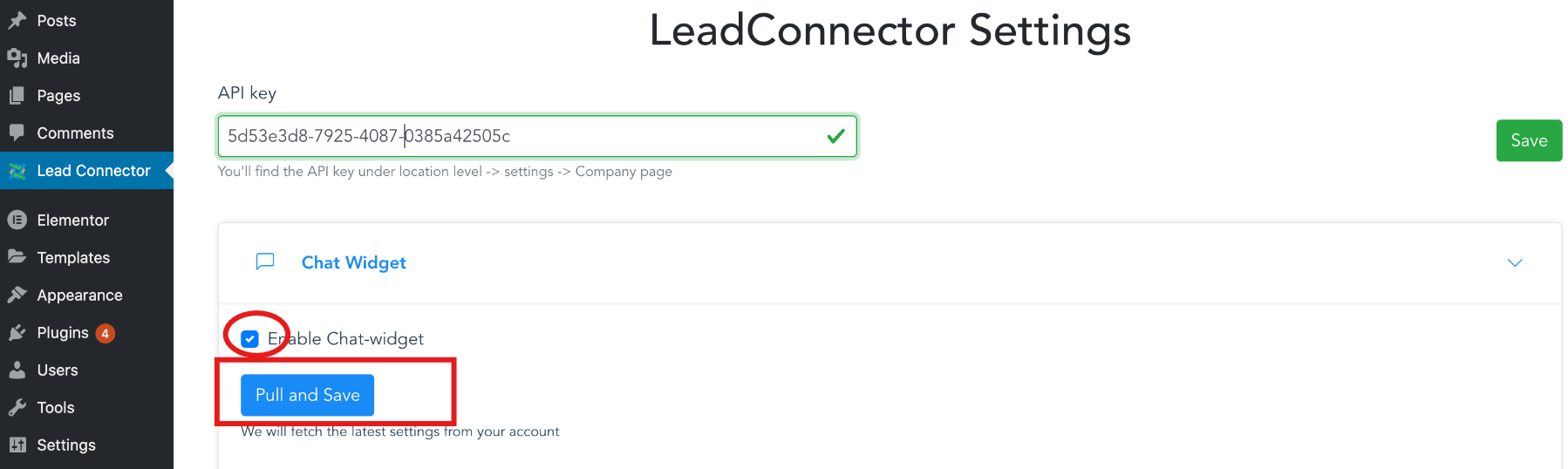
Toggle the "enable chat widget" switch and click save
Your DOJODIGI chat widget is now added to your website
Implementing Webchat on Your External Website:
Note the exact integration steps may vary depending on your CMS/Website builder.
Head to the chat widget page in the sites tab
At the top right, click on "get code"
Click on "copy code"

Login to your CMS/Website builder
Navigate into the website editor
Scroll through your site settings and find a section that says "edit footer code" or "edit body code"

Paste the code into the editor and save

Your DOJODIGI chat widget is now added to your website

NOTE: We understand not all CMS or website editors are as easy to use or as efficient as DOJODIGI. If you face troubles in successfully integrating our webchat into your website, contact support at [email protected].
Webchat Conversations:
Navigate to the conversations tab
Any incoming webchats will appear here as unread conversations and they will appear as "guest visitor"
In each live conversation, you have the options to request for their contact details which will send a form in the webchat for them to fill out and to end the live chat should there be the need
Note once the web user has filled out their contact details, their contact information and name will automatically be updated in our system


AI Chatbot
Use our Conversational AI feature to train and deploy chatbots to respond live promptly to webchat enquiries! AI chatbots can significantly enhance your business operations by providing 24/7 customer support, reducing response times, and improving customer satisfaction. According to a study by Juniper Research, chatbots are expected to save businesses over $8 billion annually, up from $20 million in 2017. Furthermore, a report by Salesforce indicates that 64% of agents using AI chatbots are able to spend most of their time solving complex problems, while chatbots handle routine inquiries. By integrating AI chatbots, businesses can increase efficiency, lower operational costs, and provide a better overall customer experience. Learn how to set yours up with DOJODIGI here
Webchat Automations:
Automations & Workflows is a key feature of DOJODIGI's in enabling businesses to increase their productivity and drive more sales and revenue. Our automations can be integrated into almost all of the features in our ecosystem including webchat.
Below is a very simple automation that notifies users/your employees or agents when a new webchat was received to reduce wait time, convert leads into sales and improve customer satisfaction.

Note: To get a webchat trigger, click on customer replied trigger, add a filter, select reply channel and select chat widget

DOJODIGI's workflows & automations is a powerful tool used to streamline operations and increase your business efficiency. Read more about it here.
DOJODIGI's Live Web-Chat feature is a powerful tool for enhancing customer engagement and driving conversions. By providing real-time support, customizing interactions, and leveraging automated triggers, you can offer a superior customer experience and boost your business success. Start using DOJODIGI's Live Web-Chat today to connect with your website visitors in meaningful ways and turn interactions into lasting relationships.
Contact us at [email protected] for any queries you may have. At DOJODIGI, we pride ourselves in customer support & satisfaction.